# Registering on the loader

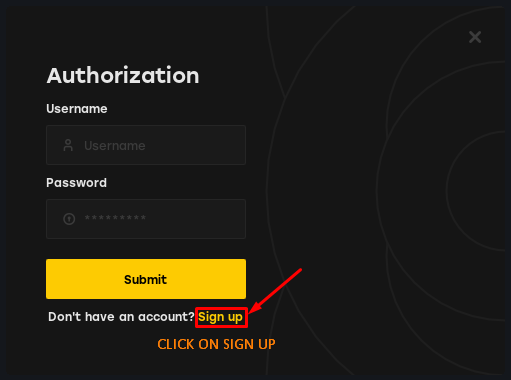
After purchasing and receiving your key through our <mark style="color:green;">automatic delivery system</mark>, open the loader that was also sent to you and go to the <mark style="color:yellow;">Sign Up</mark> section.

<figure><img src="https://3720997159-files.gitbook.io/~/files/v0/b/gitbook-x-prod.appspot.com/o/spaces%2FSds49xbRGJrFrgjC9Sz0%2Fuploads%2F3jbNAxyM7cQztfJJP38Q%2Fimage.png?alt=media&#x26;token=8d4506c5-9194-48ff-9b0f-b10e06080f25" alt=""><figcaption></figcaption></figure>

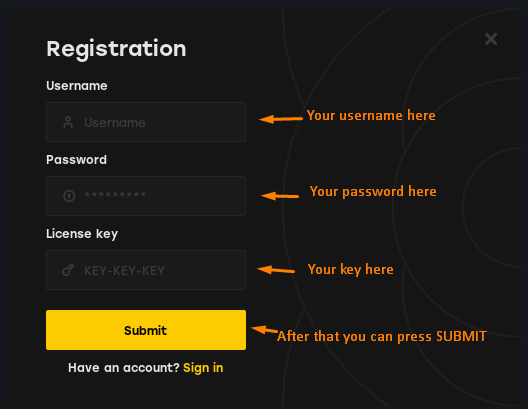
Once in the registration section, enter a username and password that you’ll remember. Then, input the key you received and click on <mark style="color:yellow;">Submit</mark>

<figure><img src="https://3720997159-files.gitbook.io/~/files/v0/b/gitbook-x-prod.appspot.com/o/spaces%2FSds49xbRGJrFrgjC9Sz0%2Fuploads%2Fp6cYtoGL3xdaZ6b4RHmc%2Fimage.png?alt=media&#x26;token=529ea940-7044-41a5-b054-dc2a3fc7c56d" alt=""><figcaption></figcaption></figure>

That’s it! <mark style="color:yellow;">If your key is valid</mark>, the spoofer will register you in our database, and you’ll have full access to our spoofer!